I'm a happy owner of a Bambulab A1 3d printer. It was my start into the 3D printing hobby and I underestimated how useful this printer would be. It started with tiny accessoires for the bathroom or the kitchen, into useful parts for my desk and now into printing miniatures and tools for painting them. Therefore I'm currently mostly printing with a 0.2mm nozzle instead of the "standard" 0.4mm nozzle.
For the past few weeks I had horrible print results, which in the end ended up in getting a new 0.2mm nozzle because I thought that might be the reason. But after exchanging the nozzle it even got worse, it fully scratched up my printing bed.
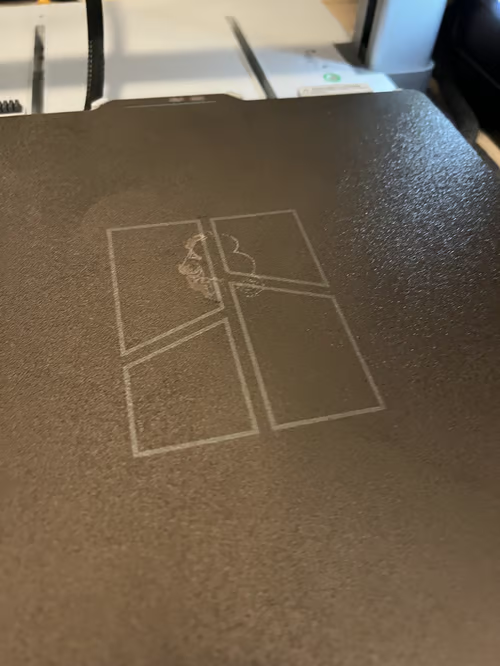
It took me quite some time to figure out what was wrong and I want to save you some time if you have the same problem. For close to 14 months, the A1 just printed without any problems. In that time I printed about 20 kg of material (mostly PLA with some PETG) and it worked like a charm.
I quickly came to the conclusion that something must be off with the Z offset or the calibration. Therefore I followed the wiki to do a full manual bed tramming. This seemed to do the trick for the 0.4mm nozzle, but the results with the 0.2mm nozzle were still awful.
After a few manual trammings, contacting the support and up- and downgrading the firmware I was out of clues what could be wrong. But luckily yesterday evening I decided to give it another round and found this video. Well, this directly pointed me in the right direction. I've noticed earlier that the nozzle was really loose when clipped into the heating unit and the 4 magic screws show in the video were not even loose. 2 of them were just missing and the remainding two were loose.
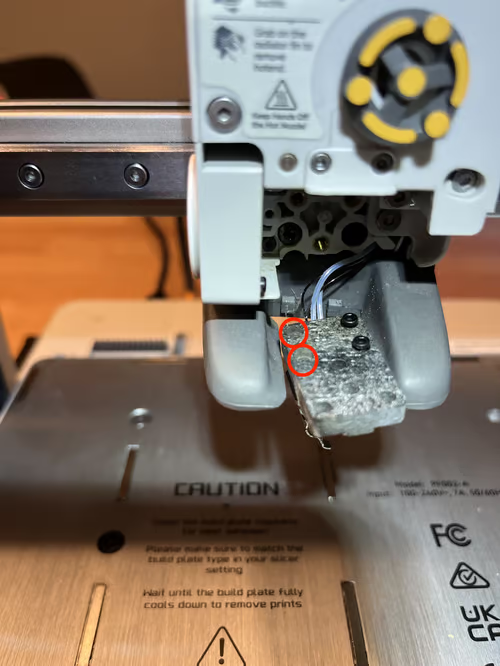
I tightened the remaining screws, did another bed tramming followed by a calibration and finally the print results are as amazing as before. If you ever have to experience bad print results with your A1 after quite some hours of printing, maybe invest the time to check if some screws decided to loosen themselves.
I still have no idea where the 2 other screws are and according to the support you can't just get the screws, but need a full new hotend heating assembly.
TL;DR: A 3D printer is a machine with lots of moving parts that must be precise to achieve good results. If something is off, invest the time to do a full checkup of every moving part and do regular maintenance.